
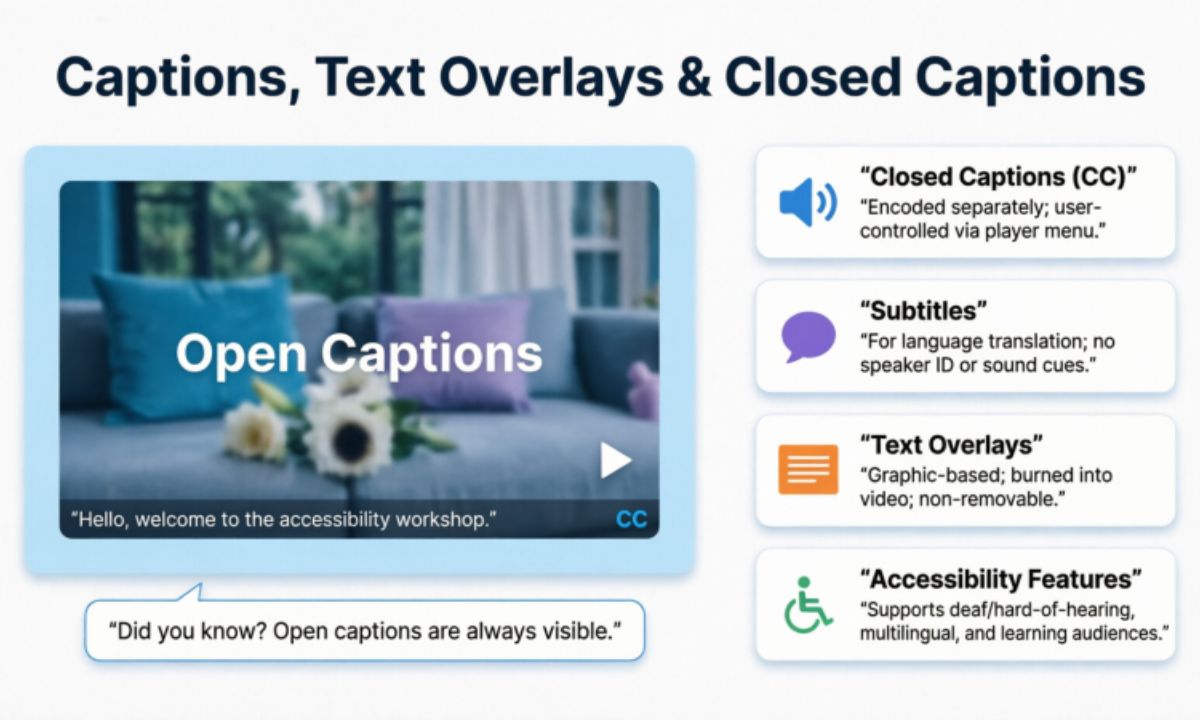
Captions are text overlays that appear on screen to represent spoken words, sounds, or other audio information in a video. They serve as a written companion to visual content, making information more accessible, searchable, and easier to understand for every type of viewer. Whether you’ve seen them on YouTube videos, social media posts, live streams, or television programs, captions have become an essential part of accessible video content and modern digital communication today.
In the world of digital media, captions play a far more important role than most people realize. They bridge the gap between audio and visual communication, ensuring that content reaches the widest possible audience, including viewers with hearing loss, sensory processing differences, and language barriers. From helping people with hearing impairments to improving comprehension for non-native speakers and supporting screen reader compatibility, captions have transformed how we connect with content.
Whether you’re a content creator, marketer, educator, or casual social media user, understanding captions can dramatically improve how you communicate visually and how discoverable your content becomes. Captions go beyond simple subtitles — they enhance storytelling, boost digital accessibility, support SEO indexing, and make your content more professional and polished. This quick guide will walk you through everything you need to know about captions, transcripts, and how to use them effectively.
Understanding Captions and Text Overlays
Captions and text overlays are two of the most powerful tools available to anyone creating visual content in today’s digital world. While they may seem simple on the surface, both serve distinct and important purposes that go far beyond just displaying words on a screen. Understanding the difference between them and knowing how to use each one effectively can completely transform the quality, accessibility, searchability, and impact of your content across every platform.
Defining Captions in Visual Content
Captions in visual content are text elements that appear alongside or on top of images and videos to provide context, dialogue, speaker identification, or additional information. They transform audio or visual messages into written form, making content more accessible, understandable, indexable, and engaging for diverse audiences across different platforms and devices.
Simply put, captions are the written voice of your visual content. They can represent spoken words in a video, describe what’s happening in an image, or add context that the visual alone cannot fully communicate, much like a synchronized transcript. Understanding what captions are, how they function, and how they relate to subtitle files such as SRT or VTT formats is the first step toward creating content that truly connects with every viewer.
The Role of Text Overlays in Media
Text overlays are written elements placed directly on top of images or videos to add emphasis, context, or additional meaning to visual content. Unlike captions that primarily represent spoken audio, text overlays serve a creative and communicative purpose, helping viewers absorb key messages quickly and effectively even without sound. They have become a fundamental tool in modern media production, social media content, advertising, and digital storytelling.
In today’s fast-moving media landscape where audiences scroll quickly and attention spans are short, text overlays play a crucial role in capturing interest and reinforcing brand voice within the first few seconds.
Distinguishing Between Captions and Text Overlays
Captions and text overlays are often confused with each other, but they serve distinctly different purposes in visual content. Captions represent spoken audio or provide accessibility and transcript data, while text overlays add creative emphasis and additional visual information.
Here’s a related and expanded table:
| Feature | Captions | Text Overlays |
| Primary Purpose | Transcribe audio | Provide context or emphasis |
| Content Source | Spoken words and sounds | Additional information or design elements |
| Timing | Synchronized with audio | Can appear at any time |
| Accessibility Focus | Deaf or hard of hearing viewers | All viewers, including those with visual impairments |
| Placement | Bottom of screen typically | Anywhere on the image or video |
| Style | Simple and readable text | Creative, branded, or decorative design |
| Format | Standardized text format | Flexible fonts, colors, and sizes |
| Common Use | Television, YouTube, films | Social media, marketing, advertising |
| Creation Method | Transcription or auto-generated | Manually designed or added in editing |
| Language Options | Multiple language translations | Single language typically |
| Required By Law | Yes, for broadcast media | No legal requirement |
| Viewer Control | Can be turned on or off | Usually permanent part of content |
| Platform Examples | Netflix, YouTube, Facebook | Instagram, TikTok, Twitter |
| Impact on SEO | Improves search indexing | Minimal direct SEO impact |
| Engagement Effect | Increases viewing time | Increases visual appeal and shares |
While captions and text overlays may appear similar at first glance, understanding their distinct roles and purposes makes you a significantly more effective and intentional content creator. Captions prioritize accessibility, ADA and WCAG compliance, and accurate audio transcription, ensuring your content reaches every viewer regardless of hearing ability or listening environment. Text overlays prioritize visual communication, emphasis, and creative storytelling that captures attention and reinforces your brand message. Using both tools strategically and knowing exactly when each one serves your content best is the key to producing professional, inclusive, and highly engaging visual content that resonates with the widest possible audience.
The Importance of Captions in Digital Media
Captions have become one of the most essential elements of digital media in today’s content-driven, search-driven world. They transform how audiences interact with videos, images, and social media posts across every platform and device. Understanding their importance helps creators produce accessible video content that ranks better, converts better, and reaches more people.
In a world where billions of videos are watched daily across multiple platforms, captions ensure that no viewer gets left behind. They make content accessible to people with hearing impairments, non-native speakers, and those watching in sound-sensitive or public environments. Their impact on audience reach, watch time, and overall content performance is both significant and measurable through analytics.
Digital media moves fast, and captions help audiences keep up. They provide an additional layer of comprehension and semantic context that supports viewers who may struggle to follow audio alone. As content consumption continues to grow globally and voice search adoption increases, captions have shifted from being optional additions to becoming absolute necessities for serious content creators.
Beyond accessibility, captions play a powerful role in search engine optimization, keyword indexing, brand consistency, and audience retention. They give platforms more crawlable text to index, making content easier to discover through organic search and natural language queries. Whether you create content for entertainment, education, or marketing, captions are a fundamental tool that elevates everything you produce.
| Benefit | Impact |
| Accessibility | Enables deaf and hard-of-hearing viewers to enjoy content fully |
| Engagement | Increases watch time and viewer retention significantly |
| Comprehension | Aids non-native speakers and clarifies complex topics |
| SEO | Improves content discoverability and search rankings |
| Flexibility | Allows viewing in sound-sensitive environments comfortably |
| Reach | Expands audience beyond language and hearing barriers |
| Social Media Performance | Boosts shares, likes, and overall content interaction |
| Brand Professionalism | Creates polished and credible content presentation |
| Learning Support | Helps students and visual learners absorb information better |
| Legal Compliance | Meets accessibility requirements for broadcast and digital media |
| Viewer Trust | Builds credibility and reliability with diverse audiences |
| Content Longevity | Extends the lifespan and relevance of older video content |
| Multilingual Support | Enables easy translation for global audience targeting |
| Cognitive Processing | Helps viewers process and retain information more effectively |
| Platform Algorithm | Signals quality content to platform recommendation systems |
| Emotional Connection | Reinforces tone and meaning through visual text representation |
| Silent Viewing | Captures attention of users browsing without sound enabled |
| Marketing Effectiveness | Increases conversion rates and call-to-action responses |
The importance of captions in digital media cannot be overstated in today’s fast-moving, content-saturated world. They are no longer optional extras reserved for accessibility purposes alone but essential tools that improve engagement, expand reach, boost search visibility and organic traffic, and create more inclusive and professional content for every type of audience.
What Are Captions: Types and Applications
Captions come in many different forms, each designed to serve a specific purpose and meet the needs of different audiences and content types. Understanding the various types of captions, including SRT and VTT caption files, and how they are applied across different media platforms is essential for anyone serious about creating content that is both accessible and effective. From closed captions on television to open captions burned into social media videos, each type carries its own unique characteristics, advantages, and ideal use cases.
Closed Captions vs. Open Caption
Closed captions and open captions are the two most fundamental types of captions used in digital and broadcast media today. The key difference between them lies in viewer control — closed captions can be turned on or off by the viewer, while open captions are permanently embedded into the video and cannot be removed. Understanding this distinction helps content creators choose the right captioning approach for their specific platform, video hosting service, and audience needs.
Both closed and open captions serve the same core purpose of making content accessible and easier to understand, but they work in very different ways technically and practically. Closed captions offer flexibility, editable transcript files, and viewer choice, making them ideal for television and streaming platforms. Open captions provide consistency and guaranteed visibility, making them increasingly popular for social media content where viewers often watch on mute or without sound. Knowing when to use each is a crucial skill for modern content creators.
| Feature | Closed Captions | Open Captions |
| User Control | Can be turned on or off | Always visible to all viewers |
| Customization | Font, size, and color adjustable | Fixed appearance cannot be changed |
| File Format | Separate subtitle file | Permanently burned into video |
| Ideal Use | Online streaming platforms | Social media videos and reels |
| Viewer Flexibility | Viewer chooses to enable | No viewer choice required |
| Technical Requirement | Requires caption-compatible player | Works on any video player |
| Editing Ability | Easily updated or corrected | Requires re-editing entire video |
| Platform Examples | Netflix, YouTube, Television | Instagram, TikTok, Facebook |
| Accessibility Compliance | Meets broadcast legal standards | Not always legally compliant |
| Production Cost | Lower cost to implement | Higher production effort required |
| Language Options | Multiple languages available | Single language typically |
| Search Indexing | Improves SEO significantly | Minimal direct SEO benefit |
| Silent Viewing | Only when viewer activates | Always visible during silent viewing |
| Brand Consistency | Variable based on viewer settings | Fully consistent across all viewers |
| Best For | Long form professional content | Short form social media content |
| Appearance Control | Limited by platform settings | Complete creative control available |
Subtitle Captions for Multilingual Audiences
In an increasingly connected global world, subtitle captions have become one of the most powerful tools for breaking down language barriers, supporting localization, and reaching audiences across different cultures and countries.
Unlike standard captions that primarily transcribe spoken audio in the same language, subtitle captions translate dialogue and audio content into different languages, allowing creators to share their message with viewers who speak entirely different languages and rely on translation services. This capability has transformed how content travels across borders and how brands, educators, and creators connect with international, multilingual audiences.
Descriptive Captions for Enhanced Accessibility
Descriptive captions go beyond simply transcribing spoken words to include detailed descriptions of sounds, music, and other audio elements that contribute to the viewing experience. They provide a richer and more complete picture of what is happening on screen, ensuring that viewers with hearing impairments and those relying on assistive technology can fully understand and enjoy content without missing any important audio information. This deeper level of detail makes descriptive captions the gold standard for true accessibility in digital media.
Unlike standard captions that only capture dialogue, descriptive captions include context like background music, sound effects, emotional tone, and environmental sounds that significantly impact how a scene or message is understood. For example, rather than simply showing spoken words, a descriptive caption might indicate that dramatic music is playing or that a door slams loudly in the background.
Text Overlay Techniques for Engaging Content
Text overlays are one of the most versatile and powerful tools available to modern content creators looking to elevate their visual storytelling and user experience. When used strategically, they transform ordinary images and videos into compelling, informative, and visually striking content. Mastering text overlay techniques is essential for anyone serious about creating content that captures attention and drives meaningful engagement.
In today’s competitive digital landscape, audiences are bombarded with content from every direction at every moment of the day. Text overlays help your content stand out by delivering key messages quickly, clearly, and visually in ways that pure imagery or audio alone cannot achieve. Learning how to use them effectively gives you a significant creative and competitive advantage.
Different text overlay techniques serve different content goals, and knowing which technique to apply in which situation is what separates amateur content from professional quality production. Some techniques are designed to grab immediate attention, while others guide viewers through a story or emphasize a specific call to action. Understanding the full range of available techniques expands your creative toolkit significantly.
The most engaging content combines strong visuals with strategically placed text overlays that feel natural, purposeful, and visually harmonious rather than cluttered or overwhelming. Typography choices, animation timing, and placement all work together to create an experience that feels polished and intentional. When these elements align perfectly, text overlays become invisible enhancements that elevate content without drawing attention to themselves.
Whether you are creating social media reels, marketing videos, educational content, or brand storytelling, text overlay techniques can dramatically improve how your message is received and remembered. The right technique applied at the right moment transforms passive viewers into engaged audiences who absorb, remember, and act on your content. This section explores the most effective text overlay techniques to help you create content that truly resonates and performs.
Text Overlay Techniques: Complete Guide
| Text Overlay Technique | Purpose | Best Practice |
| Contrasting Colors | Improve Readability | Use light text on dark backgrounds or vice versa |
| Animation | Capture Attention | Subtle movements, fade-ins, or sliding effects |
| Strategic Placement | Avoid Obstruction | Lower third of the screen for key information |
| Branding Elements | Reinforce Identity | Incorporate logo, colors, and fonts consistently |
| Font Selection | Enhance Clarity | Choose clean, readable fonts suitable for screen |
| Text Size | Ensure Visibility | Use larger text for mobile and smaller screens |
| Timing Control | Match Audio Flow | Sync text appearance with spoken words precisely |
| Color Psychology | Evoke Emotion | Match colors to content mood and brand identity |
| Shadow Effects | Improve Contrast | Add subtle shadows behind text for better readability |
| Minimal Text | Reduce Clutter | Keep messages short, clear, and easy to absorb |
| Call to Action | Drive Engagement | Place CTA text prominently at strategic moments |
| Background Overlay | Boost Legibility | Add semi-transparent background behind text elements |
| Text Hierarchy | Guide Viewer Focus | Use different sizes to separate headlines from details |
| Whitespace Usage | Prevent Overwhelm | Leave breathing room around text elements always |
| Mobile Optimization | Reach All Devices | Test text visibility on smaller screens regularly |
Benefits of Using Captions and Text Overlays
Captions and text overlays are no longer optional extras in modern content creation — they are essential tools that directly impact how your content performs, who it reaches, and how effectively it communicates your message. From dramatically improving accessibility for diverse audiences to boosting search engine visibility, keyword relevance, and social media engagement, the benefits of incorporating captions and text overlays into your content strategy are both wide-ranging and measurable. Understanding these benefits helps you make smarter, more informed decisions about every piece of content you create.
Enhancing Accessibility and Inclusivity
Accessibility and inclusivity are no longer optional considerations in content creation — they are fundamental responsibilities that every creator and brand must embrace. Captions and text overlays play a central role in making content accessible to viewers with hearing impairments, language barriers, cognitive differences, and situational limitations like noisy environments or sound-sensitive settings, while also supporting screen reader and assistive technology compatibility. Creating accessible content is not just the right thing to do ethically — it is also a smart business decision that expands your reach and strengthens your connection with diverse audiences.
Improving Content Comprehension
Comprehension is the ultimate goal of any content you create, because even the most visually stunning video fails if viewers walk away confused or unclear about your message. Captions and text overlays work together to reinforce spoken information visually, giving viewers multiple ways to absorb and process what you are communicating. When audiences can both hear and read your message simultaneously, comprehension improves dramatically, retention increases significantly, and the likelihood of them taking action on your content grows considerably.
Boosting SEO and Social Media Engagement
Captions and text overlays are among the most underutilized yet powerful tools for improving SEO performance, keyword indexing, and driving social media engagement simultaneously. Search engines cannot watch videos or listen to audio, but they can read text and crawl transcripts using natural language processing, which means captions provide valuable written content that search algorithms can index and use to rank your content more effectively. By adding captions to your videos, you are essentially giving search engines a complete written transcript that significantly improves your content’s discoverability across Google, YouTube, and other major search platforms.
| Benefit | Impact |
| Accessibility | Reaches deaf, hard-of-hearing, and non-native speakers |
| Comprehension | Improves understanding and retention of content |
| SEO | Enhances video discoverability in search results |
| Social Media | Increases engagement on silent-play platforms |
| User Experience | Makes videos easier to follow in noisy or quiet environments |
| Audience Reach | Expands viewership across different languages and regions |
| Learning Support | Helps students and professionals absorb information more effectively |
| Content Reusability | Enables easier content repurposing into blogs, transcripts, and subtitles |
| Legal Compliance | Helps meet accessibility standards and regulations (e.g., ADA, WCAG) |
| Viewer Retention | Encourages longer watch times and reduces drop-off rates |
| Brand Reputation | Demonstrates inclusivity and commitment to accessibility |
| Search Indexing | Allows search engines to index spoken content through transcripts |
| Translation Support | Simplifies creating multilingual subtitles and captions |
| Mobile Viewing | Improves usability for users watching without sound |
| Customer Engagement | Increases interaction and satisfaction with video content |
Boosting SEO and social media engagement through captions and transcripts provides long-term value for both content creators and businesses. Search engines can index text-based content and crawl transcript data, making videos more discoverable and increasing the chances of reaching a wider audience through organic search and voice search queries. This improved visibility helps attract organic traffic and strengthens an organization’s online presence.
On social media platforms, captions allow viewers to engage with videos even when sound is muted, leading to higher watch times, better audience retention, and increased interactions such as likes, shares, and comments. As a result, captioned videos often perform better across platforms where silent autoplay and mobile-first viewing are common.
Overall, investing in captions and transcripts is a practical strategy for improving accessibility, enhancing user experience, and maximizing the reach of digital content. By combining SEO benefits with stronger social media performance, organizations can increase audience engagement, improve content effectiveness, and achieve greater long-term impact.
Tools and Software for Adding Captions and Text Overlays
Adding captions and text overlays is one of the easiest ways to make photos, videos, and social media posts more engaging and accessible. Whether you’re creating Instagram Reels, TikTok videos, YouTube Shorts, or business content, the right tool can help you add clear, eye-catching, keyword-rich text in just a few clicks.
There are many free and paid apps available for beginners and professionals alike. Popular options offer customizable fonts, animations, colors, and templates, making it simple to create polished content that captures attention and improves viewer engagement.
Video Editing Software with Caption Features
Video editing software with built-in caption features makes it easy to create professional and accessible videos. These tools can automatically generate subtitles using automatic speech recognition, let you edit text, and customize fonts, colors, and animations to match your style.
Whether you’re editing content for YouTube, TikTok, Instagram, or business presentations, caption-enabled video editors save time and improve viewer engagement. Many also support AI-powered transcription and machine learning models, making the captioning process faster and more accurate.
Online Caption Generators and Editors
Online caption generators and editors make it quick and easy to create captions without downloading any software. Many of these web-based tools use AI and natural language processing to generate accurate subtitles, while also offering options to edit text, adjust timing, and customize the appearance.
These platforms are ideal for content creators, marketers, teachers, and businesses who need fast results. With features like automatic transcription, multiple language support, and stylish text templates, you can produce engaging, accessible videos in just a few minutes.
Social Media Platform Caption Tools
Many social media platforms now include built-in caption tools that make it easy to add text directly to your videos. These features help improve accessibility, increase engagement, and allow viewers to watch content even when the sound is off.
Here’s a cleaner, SEO-friendly, and properly formatted related table:
| Tool Type | Popular Examples | Key Features | Best For |
| Professional Video Editing Software | Adobe Premiere Pro, Final Cut Pro, DaVinci Resolve | Advanced editing, customizable captions, motion graphics | Professional creators and filmmakers |
| Online Caption Generators | Kapwing, Canva, VEED.io | AI captions, browser-based editing, easy customization | Beginners and quick video edits |
| Social Media Caption Tools | Instagram, TikTok, Facebook, YouTube | Built-in auto captions, text overlays, simple editing | Fast publishing on social media |
| Automatic Caption Generators | Rev, Otter.ai, YouTube Auto Captions | AI speech-to-text, subtitle generation, transcription | Fast and accurate caption creation |
| Mobile Caption Apps | CapCut, InShot, VN Editor | Auto captions, animated text, mobile-friendly editing | Content creators editing on smartphones |
| AI Video Editing Tools | Descript, Captions, Clipchamp | AI transcription, subtitle styling, voice editing | Podcasters, educators, and marketers |
Social media platform caption tools are a simple and effective way to make your videos more engaging, accessible, and discoverable. By using the built-in caption features available on popular platforms, you can save time, improve viewer retention, and reach a wider audience without relying on additional editing software.
Measuring the Impact of Captions on Content Performance
Measuring the impact of captions helps you understand how they affect your content’s performance, search visibility, and audience engagement. By tracking key metrics such as watch time, views, click-through rate, bounce rate, and audience retention, you can see whether captions are helping your videos reach more people.
Captions also improve accessibility and make it easier for viewers to follow your content without sound. Regularly reviewing your analytics allows you to refine your caption style, improve user experience, and create content that performs better across different platforms and search engines.
Analytics for Caption Engagement
Analytics for caption engagement help you measure how viewers interact with your captioned content. By monitoring metrics like watch time, average view duration, engagement rate, and completion rate, you can determine whether your captions are keeping audiences interested.
Reviewing caption performance also helps identify what works best for your audience. Comparing videos with different caption styles, lengths, and placements can provide valuable insights that improve future content and increase overall engagement.
A/B Testing Caption Styles and Formats
A/B testing caption styles and formats is an effective way to discover which captions perform best with your audience. By creating two versions of the same content with different fonts, colors, wording, or caption placement, you can compare their performance using real engagement data.
Testing different caption formats helps improve watch time, click-through rates, and audience retention over time. Regular A/B testing allows you to refine your content strategy and choose the caption style that delivers the best results across different platforms.
User Feedback and Preference Surveys
User feedback and preference surveys provide valuable insights into how your audience feels about your captions. Asking viewers about readability, timing, font size, and overall viewing experience helps you understand what they like and what could be improved.
Collecting feedback through polls, surveys, comments, or social media questions allows you to make informed decisions about your caption style. Using audience preferences to guide future content can improve engagement, accessibility, and overall viewer satisfaction.
FAQs
What are captions in videos?
Captions are text displayed on a video that shows spoken dialogue and, in some cases, important sounds. They make videos easier to understand and more accessible to all viewers, including those relying on assistive technology.
What is the difference between captions and subtitles?
Captions include spoken words and important audio cues, while subtitles usually translate or display only the dialogue for viewers who can hear the audio but speak a different language.
Why are text overlays important?
Text overlays highlight key information, improve engagement, and help viewers follow content even when watching without sound or in a public setting.
Which tools can I use to add captions?
You can add captions using video editing software, online caption generators, mobile apps, or built-in social media caption tools such as Instagram, TikTok, and YouTube.
Do captions improve video performance?
Yes. Captions can increase watch time, audience retention, search discoverability, accessibility, and engagement by making videos easier to follow in any viewing environment.
Conclusion
In conclusion, captions play a vital role in making video content more accessible, searchable, engaging, and easier to understand for all audiences. Whether you use text overlays to emphasize key messages or closed captions to improve accessibility and SEO, both enhance the overall viewing experience. They also help viewers consume content in sound-off environments and support better audience retention.
Choosing the right type of captions depends on your content goals and audience needs. By understanding the differences between text overlays and closed captions, you can create videos that are more inclusive, professional, and effective. Adding well-crafted, keyword-relevant captions is a simple step that can improve user experience while increasing the reach and impact of your content.

- Evening Messages: 401+ Best Romantic, Sweet & Inspirational Wishes for 2026 - October 21, 2026
- Birthday Captions: 250+ Romantic, Cute & Funny Ideas to Make Every Moment Special (2026) - October 21, 2026
- Love Captions in English: 500+ Best Short, Cute & Romantic Lines for 2026 - October 21, 2026